Improvement
Redesigned job creation experience
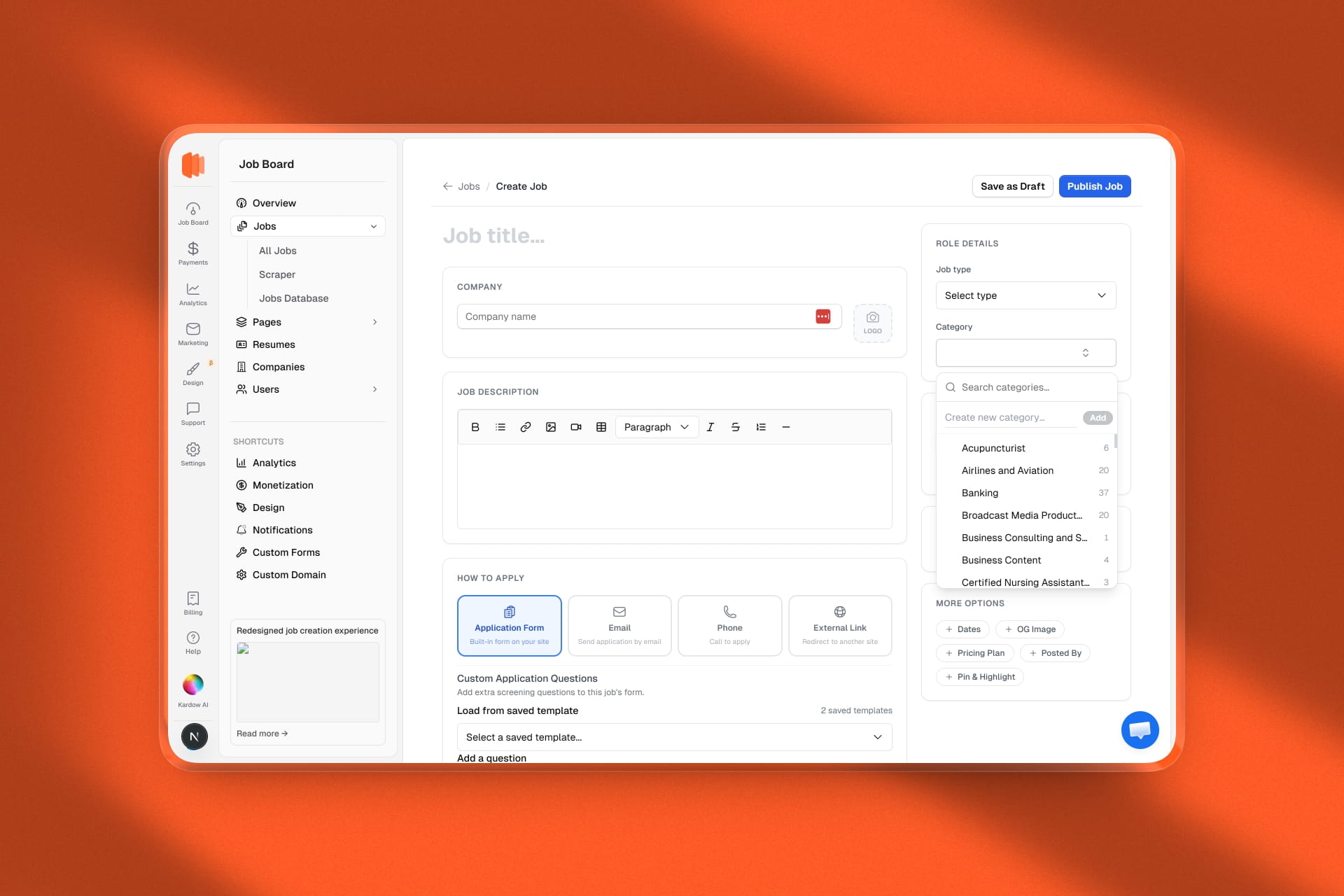
- The "Add Job" button now opens a full dedicated page instead of a side drawer. More room to work, no more cramped scrolling inside a panel.
- Two-column layout. The left side holds the job title, company details, description, and application settings. The right sidebar keeps role type, category, location, compensation, and advanced options always visible as you write.
- Salary input completely rethought. Instead of two identical-looking min/max fields that confused most users, there's now a single toggle to show compensation and a segmented control to pick Exact amount or Range. Exact shows one field. Range shows two. No more accidentally filling both with the same number.
- Application method is now a row of visual cards — Application Form, Email, Phone, External Link — so it's obvious at a glance what you're selecting.
- Location search now uses Google Places instead of Mapbox. Better results globally, especially for Australia, Southeast Asia, and smaller cities.
- Auto-save draft to browser storage. If you navigate away or close the tab by accident, the next time you open the create page a yellow banner lets you restore everything you typed — title, company, description, salary, all of it. You can also discard it and start fresh.
- Company logo is now a compact click-to-upload square next to the company name field. No more full-width upload block taking up half the form.
- Category picker rebuilt. Same style as the currency picker: a popover with a search box, each category shows how many jobs are assigned to it, and there's an inline "Create new category" input right inside the popover — no need to go to settings.
- Currency selector now shows the code and symbol (e.g. "USD $") instead of the full currency name, which was overflowing in the small sidebar column.
- Advanced options are hidden behind expandable pills at the bottom of the sidebar: Dates, OG Image, Pricing Plan, Posted By, Pin & Highlight. They expand inline when needed and stay out of the way otherwise.
- Add a custom field without leaving the form. A new "+ Add field" button in the Custom Fields section opens a small sheet where you can create a new field (label, type, required toggle) and it appears in the form immediately.
- Sticky header bar with Save as Draft and Publish Job always visible at the top — no need to scroll to the bottom to submit.